Workflow Automations
Two bots built to learn workflow automation, running on my own n8n Cloud account
What it does
Two workflow bots built on n8n Cloud as a way to learn the tooling. They run on my own account, for my own use, with no users besides me. One is a Telegram bot for a shared grocery list that takes commands in English and Hebrew and keeps state in Postgres. The other watches a Google Sheet of flight routes and alerts when Amadeus fares move.
How it works
Grocery Bot
Parse the command
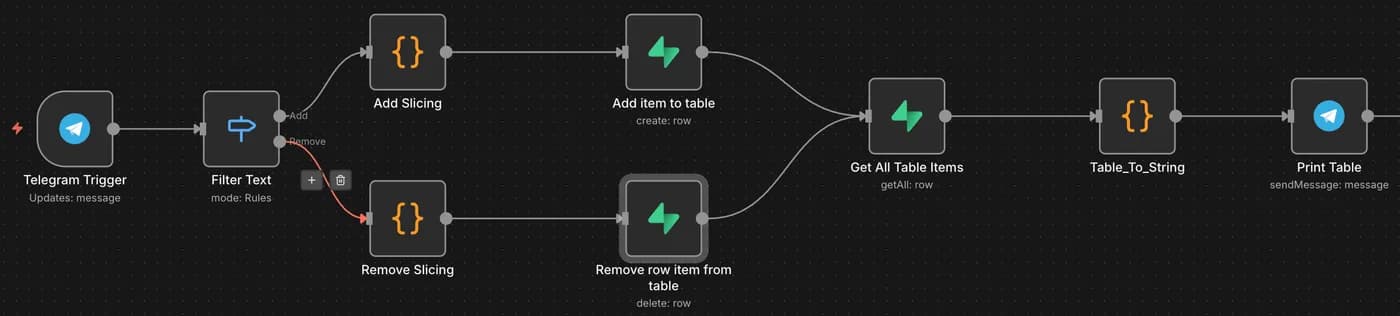
A Telegram trigger feeds a switch on add and remove, in English and Hebrew. Text is normalised for case and stray whitespace so the same item does not end up stored twice.
Persist to Postgres
Supabase holds the list with an identity primary key, UTC timestamps and a status column, so removed items are marked rather than deleted and the history stays intact.
Flight Monitor
Read the wishlist
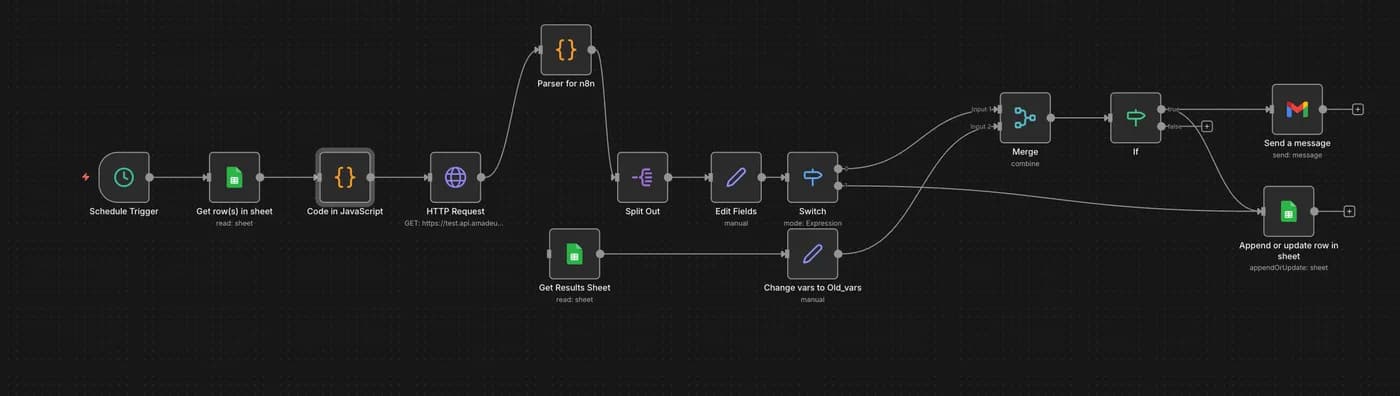
Routes and target dates come from a Google Sheet, which makes the whole thing editable by someone who will never open n8n.
Fan out around each date
Each row expands into up to seven Amadeus searches covering plus or minus three days, since flying a day either side is often much cheaper. Past dates are dropped and the original date is flagged.
Diff against the last run
A parallel branch pulls the previous results, renames fields to avoid collisions, merges the two sets, then routes through conditionals to either fire an alert or quietly upsert the row.
The shape of it
Schedule trigger
- read wishlist:
Google Sheet
routes and dates
- one row becomes seven:
Amadeus search
plus or minus three days
- compare:
This run
Previous run
read from the sheet
- route on the difference:
Alert
price moved
Upsert quietly
nothing changed
Tech choices
The decisions that shaped it, and why they went that way.
- The diff is the whole point
- Without comparing against the previous run, a price monitor is just a thing that emails you the same fare every morning.
- A spreadsheet as the interface
- Using Sheets for input means the config is editable by anyone, with no deploy and no UI to build.
- Soft deletes
- The status column keeps removed items queryable, which costs nothing and makes the data worth keeping.
Built with
- Platform
- n8n CloudJavaScript code nodes
- Grocery Bot
- Telegram Bot APISupabasePostgreSQL
- Flight Monitor
- Amadeus APIGoogle Sheets
What it produces
How the repo is laid out
Roughly the order you'd read it in: entry point first, then the parts doing the work.
Grocery Bot
workflow.jsonThe exported graph: Telegram trigger to Postgresschema.sqlGroceries table: item, status, timestampsFlight Monitor
TakeResult.jsExpands one sheet row into seven date searchesParser.jsUnwraps the Amadeus response, adds airline names
Where it falls short
These are learning projects, not products. They were built to understand workflow tooling, they run on my own n8n account for my own use, and they have never had a user other than me - so nothing here should be read as production traffic. They are also low-code: most of the logic lives in the n8n graph rather than in code I wrote, and the hand-written JavaScript is under a hundred lines across both. I include them for the shape of the problem, particularly the diff against the previous run that turns a scheduled search into an alert, not as a demonstration of engineering depth.